

 iMelonArt
Advice · 8 min read
How to spot a fake job posting before you apply
Job scams copy real applications. Learn the warning signs, a 5-minute check to run before you apply, and what to do if you already paid or shared details.
November 25, 2026

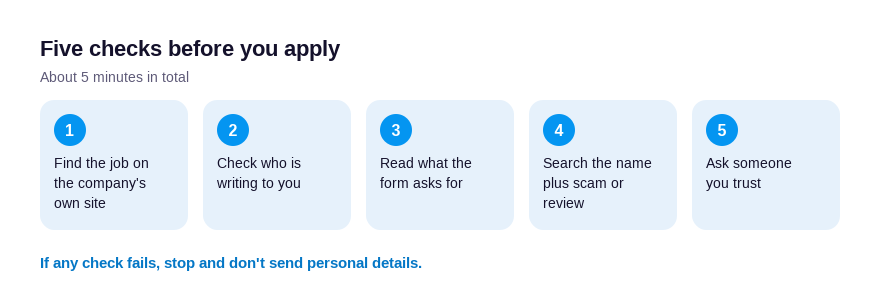
You found a job that looks perfect, or a recruiter texted you out of nowhere. Before you send your CV, how do you know the job is real? Check five things: the job is listed on the company's own career site, the message comes from a company address, nobody asks you to pay, the form asks only for normal application details, and a quick search for the company name plus "scam" shows no complaints. If any check fails, stop and don't send personal details.
This guide gives you a 5-minute routine for that, a table of warning signs, and what to do if you already shared something you shouldn't have.
Why a few minutes of checking is worth it
Scammers advertise jobs the same way honest employers do. The Federal Trade Commission (FTC) says they use ads, job sites and social media, and what they want is your money and your personal information.
The numbers moved fast. In its December 2024 data spotlight, the FTC reported that reported losses to job scams rose from $90 million in 2020 to $286 million in 2023, and passed $220 million in the first half of 2024 alone. These are the latest figures we found on the FTC's public pages, and they only count people who reported.
None of this means every posting is a trap. It means a short routine is cheap insurance, especially when you are tired and sending your tenth application of the week.
Warning signs at a glance
The FTC's job scam pages describe the same patterns again and again. Here they are in one table you can scan.
| What you see | What it usually means | What to do |
|---|---|---|
| You must pay for training, a starter kit, a certificate or "background check" fees to get the job | The FTC says honest employers never ask you to pay to get a job | Stop. Don't pay |
| A check arrives and you are told to deposit it and send part of the money on | A fake check scam. The check bounces and the bank wants the money back from you | Don't deposit it. Stop talking to them |
| An unexpected text, WhatsApp or Telegram message about "easy online work" | Possibly a task scam. The FTC says real employers will never contact you that way | Don't reply. Block and report |
| The job is to receive packages and reship them | A reshipping scam. The FTC says reshipping goods is never a real job | Decline |
| A "placement firm" wants an upfront fee | The FTC says honest placement firms do not typically charge job candidates | Don't pay |
| Big money for little work, "be your own boss" | The FTC says an offer like this is almost certainly a scam | Treat as a no |
| The job only exists inside a message, with no listing on the company's own site | Nothing to verify | Ask for the listing link, then check it yourself |
A 5-minute check, step by step
1. Find the job on the company's own career site
Open a new tab and search for the company's name yourself. Don't click the link in the message. Go to its real website, find the careers page and look for the same role.
If the role is there, apply on that page. If it isn't, ask the recruiter for the listing, and be wary if they can't give you one. Many company career sites use systems such as Workday, Greenhouse, Lever or Ashby. For a walkthrough of one of them, read our guide to filling a Workday application fast.
2. Check who is writing to you
Look at the sender's address and compare it with the company's website. A message from a free webmail address that claims to be from a large company deserves a pause. So does a first contact through a messaging app. The FTC describes task scams as starting with an unexpected message on WhatsApp, Telegram, text or social media.
If you're unsure, contact the recruiter through a phone number or page you found yourself. A real recruiter won't mind.
3. Read what the form asks for
An application needs your contact details, your work history, your education and your right to work. It does not need your bank login, your card number or a payment of any kind. If a form asks for money, stop.
4. Search the name plus "scam", "review" or "complaint"
This is the FTC's own advice: look up the company or the person hiring you with one of those words. Complaints can tip you off. No complaints doesn't prove the company is honest, because new scams appear all the time.
Be a little careful with glowing reviews. The FTC warns that testimonials may not be true or typical and that positive reviews can come from made-up profiles.
5. Ask someone you trust
Describe the offer to a friend or a former colleague. It takes two minutes, and it gives you time to think.
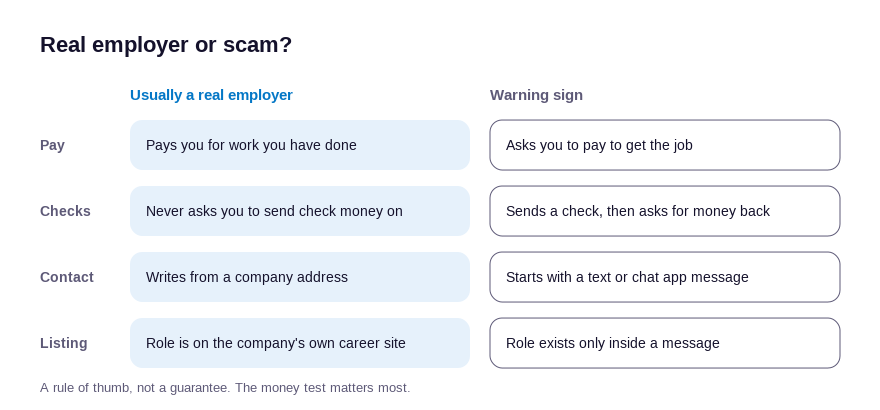
Real employer or scam: the quick comparison
This diagram puts the main differences side by side. It is a rule of thumb, not a guarantee, because a scam can look polished. The money test matters most.
Where to look instead
If you'd rather start from a trusted list, the FTC points to USAJobs.gov for federal jobs, to CareerOneStop (sponsored by the U.S. Department of Labor) and to local government websites. The FTC adds that it is always free to apply for a federal or postal job.
Task scams deserve a special mention because they are the fastest growing type. The FTC explains that in a task scam the earnings you see in the app are fake, and the scammers may pay you $5 to $20 at first to earn your trust. In a sample of reports from the first half of 2024, the FTC estimated 38.8% were task scams.
A worked example
Here is a made-up example, so you can see the checks in action.
On a Tuesday evening you get a text: "We reviewed your profile and have a remote data entry role. Pay is $45 an hour. Message us on WhatsApp to start today."
- Own site? You search for the company. It has no careers page, and no data entry role is listed anywhere.
- Who is writing? An unknown number, no company name you can verify, and a push to move to a messaging app.
- What does it ask? To start today, with no interview.
- Search. You type the company name plus "scam" and find other people describing the same text.
- Ask someone. Your sister reads it and says it sounds wrong.
Two or three failed checks is enough. You delete the message, block the number and report it to the FTC. That took about five minutes.
Where OneClick Apply fits, and where it doesn't
OneClick Apply can't tell you whether a job is real. It doesn't check employers, and it isn't a scam filter. It also does nothing on job boards' own one-click Apply buttons, such as LinkedIn Easy Apply or Indeed Apply.
What it does is fill a form after you press Fill this form, copying facts word for word from the profile you built from your CV. That is exactly why the order matters. Do your checks first, then fill the form. A fake form would receive your details just like a real one would.
It never presses Submit, so you always review the form and send it yourself. Use that moment to read the whole page once more. If anything feels off, close the tab.
If you want to compare ways of speeding up applications, we cover that in auto-apply bots, AI agents or OneClick Apply. If something about the extension is unclear, our support page is the place to ask.
Common snags
- "The recruiter is friendly and the company looks real." Scammers can copy a real company's name. Run the checks on the person and the channel, not only on the brand.
- "The posting is on a big job board." The FTC notes that scammers advertise on job sites too. A listing on a board isn't proof, so look for the same role on the company's own site.
- "I'm in a hurry." Pressure to act today is a reason to wait. A real job will still be there tomorrow.
If you already paid or shared details
First, contact the company you used to send the money. The FTC says that, however you paid, you should report the fraud and ask for the transaction to be reversed if possible. Its advice covers cards, payment apps, wire transfers, gift cards and cryptocurrency.
Then report the scam to the FTC at ReportFraud.ftc.gov. You can also report it to your state attorney general. If you gave out an ID number or bank details, read the FTC's advice on identity theft.
Questions people ask
Is it normal to be asked for my Social Security number on an application? Treat it as a reason to pause. Check that you are on the company's own site and that a real person has been in touch. If you're unsure, ask the employer on a phone number you found yourself.
Can a real job be posted by a recruiter I've never heard of? Yes. Many companies use outside recruiters. The FTC says honest placement firms do not typically charge job candidates a fee.
Does a listing on LinkedIn or Indeed mean it's safe? No. Treat it as a lead and confirm the role on the employer's own site before you share details.
Summary
Check the listing on the company's own site, check who is writing to you, read what the form asks for, search the name plus "scam," and ask someone you trust. Never pay to get a job, and never deposit a check and send money on. If a job fails these checks, delete the message and report it. If it passes, apply on the company's own career page, review everything and press Submit yourself.
Try it on your next application
Your first 5 applications are free. OneClick Apply fills the form and stops before Submit.
Sign upRead next
More guides


OneClick Brief · every Monday
Get the next guide in your inbox
A job search prompt for the week, new guides and what's new in OneClick Apply.