

 iMelonArt
Comparison · 6 min read
Auto-apply bots, AI agents or OneClick Apply: which should you use?
Three kinds of tools now fill job applications for you. Here is what each one does well, where each one falls short, and when OneClick Apply is not the right choice.
November 21, 2026

A year ago, filling a job application meant typing your CV into a form, again. Today three kinds of tools offer to do it for you: autofill extensions, auto-apply services and general AI agents. The short answer: if you want the typing done but still want to check and send every application yourself, use an autofill extension like OneClick Apply. If you only send a handful, the AI assistant you already pay for may be enough.
They work in very different ways, and the difference matters more than the price. This guide explains the three, honestly, including when you don't need us at all.
The three kinds of tools
| What it does | Who presses Submit | Best for | |
|---|---|---|---|
| Autofill extensions | Fill the form from your profile in your browser | You | Applying carefully to jobs you chose |
| Auto-apply services | Find jobs and send applications for you, often hundreds a month | The tool | Volume, if you accept less control |
| General AI agents | An AI assistant (Claude in Chrome, ChatGPT, Gemini in Chrome) that can click and type on any page | Usually you, after it asks | A few applications, if you already pay for one |
OneClick Apply is an autofill extension with a web account. It fills the form and stops before Submit.
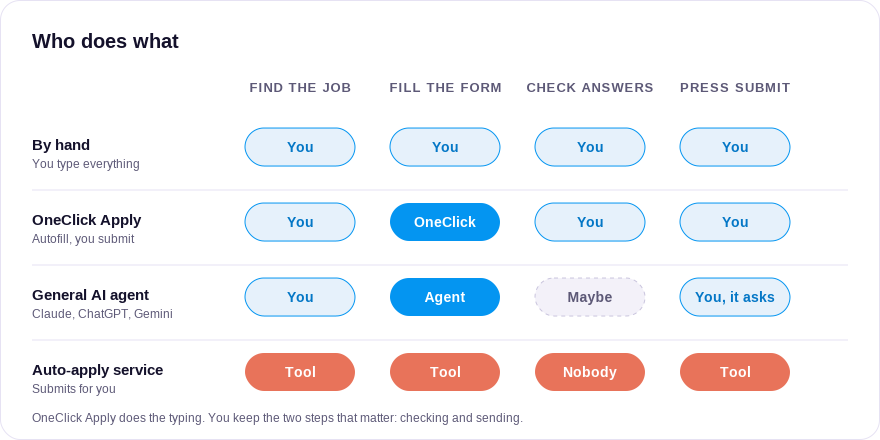
Auto-apply services: volume at a price you don't see
Auto-apply services promise to send applications while you sleep. Some apply to hundreds of jobs a month. The appeal is obvious when a search feels like a numbers game, and when every application seems to vanish without a reply.
The cost is control. When a tool submits for you, nobody checks each answer before an employer reads it. Reviews of these services often mention applications sent to the wrong roles, answers that stretch the truth, and the same job applied to twice. Recruiters notice too: many now receive more applications than they can read, and a generic one is easy to set aside.
There is a quieter cost as well. Every application sent in your name is a first impression with that employer. If a tool sends a weak one to a company you would have loved to work for, you rarely get a second chance there.
If you choose an auto-apply service, read its terms on job boards. Some boards forbid automated applications on their own Apply buttons, and accounts can be restricted.
General AI agents: good for a few, not built for a search
Browser agents can now read a page, click and type. If you already pay for one, asking it to fill a single application from your CV works, and it costs you nothing extra.
They are general tools, though, not job tools:
- They start from zero every time. An agent has no profile of you and no memory of what you answered last week, unless you give it your CV again.
- They use your chat allowance. Browser actions count against the same limits as your conversations.
- Long forms are hard for them. Multi-page systems such as Workday, with an account to create and five or six steps, are where agents most often stop and hand back to you.
- They can say a task is done when it isn't. Google, for one, warns in its help pages that its agent can wrongly report a task as complete. You still need to check the result.
If you send one to five applications and already pay for an AI assistant, use it. OneClick Apply is for when you apply regularly and want every form filled the same, checked way.
What OneClick Apply does differently
- Your profile, once. Upload your CV and we build your profile. Anything we can't find is marked Missing, so you add it once. We never guess.
- Facts are copied, not written. Your name, contact details, experience and education go into the form word for word from your profile. No AI is used for those.
- AI only where it helps. For open questions such as "Why this role?", the extension drafts an answer from your profile under the question. You read it, change it, and click Fill in only if you want it.
- It stops before Submit. Every time. You check the page and send it yourself.
- Answers it isn't sure about are marked. You see what to check before you send.
- Private by design. Your data is stored in the EU, never sold, and never used to train AI. You can export or delete it at any time.
Five questions to ask before you choose any tool
Whatever you pick, these five questions tell you most of what you need to know. Ask them of us too.
1. Who presses Submit?
This is the biggest difference between tools. If the answer is "the tool", you are trusting it with your name in front of every employer it writes to. If the answer is "you", you keep the last look.
2. Does it ever invent an answer?
A good tool leaves a field empty when it doesn't know. A risky one fills it with something plausible. Look for a clear statement about this. OneClick Apply leaves unknown answers for you and marks uncertain ones.
3. Where does my CV go, and who can read it?
Your CV holds your address, your phone number and your whole work history. Check where it is stored, whether it is sold or shared, whether it is used to train AI, and whether you can delete it. A tool that can't answer these questions plainly is telling you something.
4. Does it remember me between applications?
The time you save comes from not repeating yourself. A tool with a profile and saved answers gets faster with each application. A tool that starts from zero each time saves you less than it seems.
5. What does one application really cost?
Compare the price per application, not the headline price. Check whether unused applications expire, whether a plan renews by itself, and what happens if a form fails halfway. OneClick Apply gives you 5 applications to start and 5 every month for free, and credit packs from $5 that are valid 6 months, with no subscription.
What each kind of tool costs, roughly
Prices change often, so treat this as a shape rather than a quote.
- Auto-apply services usually charge a weekly or monthly subscription, sized by how many applications they send for you.
- General AI agents come with an AI assistant subscription you may already have. There is no extra charge, but browser tasks use the same allowance as your chats.
- Autofill extensions are often free for basic filling, with paid extras. OneClick Apply's free applications cover a slow search, and credit packs cover a busy month.
Questions people ask
Will an employer know I used a tool?
The employer sees what you submit, the same as if you had typed it. What gives an application away is a generic answer, not the tool. Some forms now ask whether you used AI to write your answers. If they do, answer honestly.
Can I use OneClick Apply and an AI assistant together?
Yes. Many people let OneClick Apply fill the facts and use an assistant to think through a hard essay question. Just make sure the final words are yours.
Does OneClick Apply work on LinkedIn Easy Apply or Indeed Apply?
No. Those are the job boards' own Apply buttons, and we don't automate them. OneClick Apply works on employers' own application forms, such as their careers site.
When OneClick Apply is not for you
- You want a tool to apply to hundreds of jobs without looking. We will never submit for you.
- You only apply through a job board's own one-click Apply button. Those flows are the board's own, and we don't automate them.
- You send an application or two a year. Your browser's own autofill, or an AI assistant you already have, may be enough.
The short version
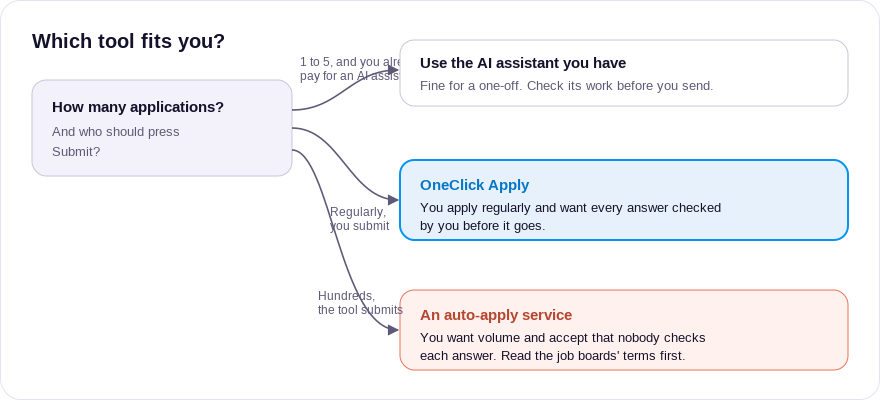
Pick the tool by who you want to press Submit. If it's the tool, an auto-apply service. If it's you, but you want the typing done, an autofill extension like OneClick Apply. If it's a one-off, the AI assistant you already pay for.
*Written on November 21, 2026. These tools change fast: tell us on the Support page if something here is out of date. Related: How to fill a Workday application in minutes and Using AI on job applications without sounding like a robot.*
Try it on your next application
Your first 5 applications are free. OneClick Apply fills the form and stops before Submit.
Sign upRead next
More guides


OneClick Brief · every Monday
Get the next guide in your inbox
A job search prompt for the week, new guides and what's new in OneClick Apply.