

 iMelonArt
Advice · 7 min read
Does an ATS reject your job application? What really happens
Most recruiters say an ATS does not auto-reject resumes. See what really happens after you press Submit, and a checklist of what you can control.
November 22, 2026

You press Submit on an application and hear nothing back. It is easy to blame the applicant tracking system (ATS), the software that sits behind Workday, Greenhouse, Lever, Ashby and most other career sites. Here is the short answer: in one recent recruiter survey, 92% of recruiters said their ATS does not auto-reject resumes, and people read the applications. Silence usually has other causes, and a few of them are in your hands.
What recruiters actually say happens to your application
The idea that software throws away 75% of resumes is everywhere. The HR Gazette notes that this number rarely cites a credible source. A resume-building company called Enhancv interviewed 25 U.S. recruiters in September and October 2025 and published what they said.
Here is what came out of it:
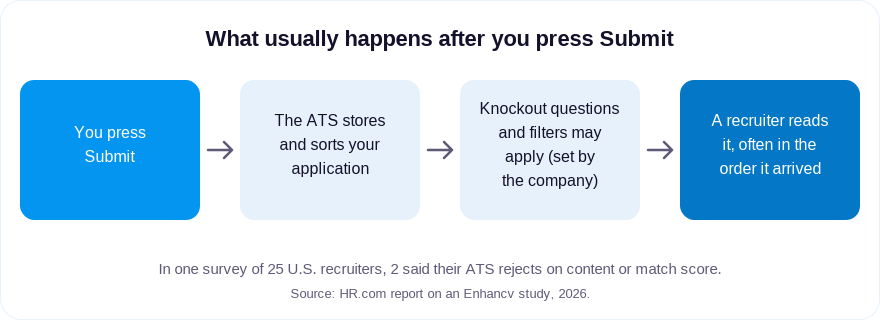
- Only 2 of the 25 recruiters (8%) said their ATS was set up to reject resumes automatically based on content or match scores.
- The other 92% reviewed applications by hand. They used filters to sort and prioritize, not to remove people.
- 52% said they review applications in the order they arrive, so early applications get seen first.
A separate ClearanceJobs write-up from July 29, 2026 of a recruiter survey reached the same conclusion. It says the real problem is the sheer number of applications, not the software.
Be careful with this evidence. It is 25 people, and the study came from a company that sells resume tools. It is one useful data point, not a law of nature. Your target company may be set up differently.
What an ATS does do
An ATS is closer to a filing cabinet with a search box than to a judge. It stores your application, keeps your answers in one place, and lets the recruiter sort, tag and move people between stages. That is what the HR Gazette means when it says these tools organize applications and do not eliminate them.
There are two features worth knowing about:
- Knockout questions. These are required questions with a wrong answer for the role. Typical examples are whether you have the right to work in the country, whether you can work from a specific location, or whether you hold a license the job needs. The HR Gazette summary says recruiters rely on human review guided by knockouts and optional scores.
- Optional scores and filters. Some companies sort by a match score or filter by a field. Most recruiters in the survey used these to decide what to read first.
The same source adds that some systems can auto-reject based on strict criteria, and that this possibility is the kernel of truth the myth grew from. So the honest answer is not "never". It is "rarely, and mostly through questions you answer yourself."
Why applications still go unanswered
If the software is not the villain, what is? According to the recruiters in the surveys above, mostly volume. A recruiter with hundreds of applications for one role cannot reply to everyone, and reading in arrival order means a late application waits at the back.
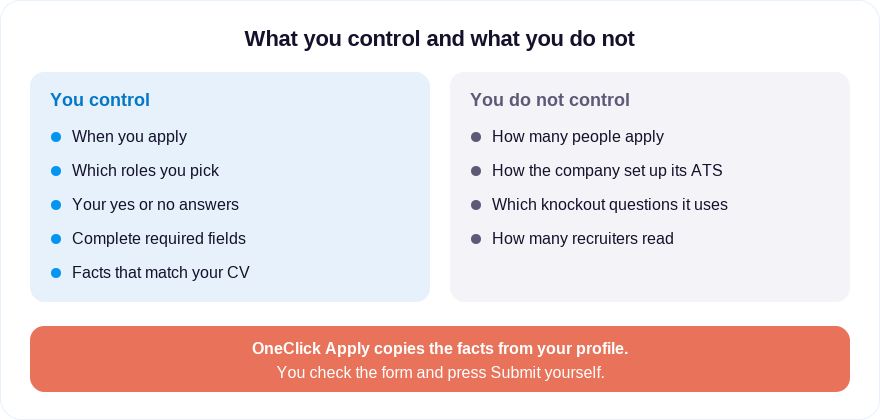
That is good news in a practical way. You cannot change how many people apply. But you can change four things:
- When you apply. Earlier is better, since many recruiters read in the order applications come in.
- Whether you meet the stated requirements. One recruiter quoted by HR.com said the ATS will only reject you if you don't meet the position requirements. Read the posting honestly before you spend time on it.
- Whether your answers are correct and complete. A required field left blank or a knockout question answered by mistake can cost you the application.
- Whether the application is short and clear for a human. The HR Gazette's advice is concise, tailored resumes that respect the recruiter's time.
What you control and what you do not
A checklist you can use before every Submit
Use this table as a last look at the form. It takes about two minutes.
| Check | Why it matters | What to do |
|---|---|---|
| Right to work and location questions | These are the most common knockout questions | Answer truthfully and make sure the answer matches your situation today |
| Required fields | A blank or placeholder answer looks careless | Scroll the whole page, not just the top |
| Dates and job titles | Mismatches with your CV look careless | Check they match your CV exactly |
| Contact details | A typo means nobody can reach you | Read your email and phone number twice |
| Open questions | Generic answers are easy to spot | Edit until it sounds like you and every claim is true |
| Files | Sending an old or wrong file wastes the application | Check the file name and version before you send |
| Posting age | Many recruiters read in arrival order | Apply within the first days when you can |
A worked example
Take Maya, who is applying for a customer success role on a Greenhouse career page. The posting asks for 3 years of experience, and she has 4. The form asks, "Are you legally authorized to work in the United States?" and "Will you now or in the future require sponsorship?"
Maya is in a hurry, so she picks the first option in each dropdown on autopilot. The first answer is right. The second is not. If that company has a knockout rule on sponsorship, her application could drop out for a reason that has nothing to do with her skills.
The fix is dull and it works. Before she submits, she reads every answer against what she knows is true. Wrong clicks on yes or no questions are one of the few ways software can affect your application, and they are easy to prevent.
Where OneClick Apply fits, and where it does not
OneClick Apply cannot see how a company has configured its ATS, and it cannot make you pass a filter. It does not promise anything about interviews. What it can do is take away the type of slip described above.
When you press Fill this form, facts such as your name, contact details, address, experience, education, skills, languages, links and right to work are copied word for word from your profile. No AI is used for those. If your CV does not contain something, it is marked Missing so that you can add it. It never guesses.
For open questions like "Why this role?", it drafts an answer with AI from your profile and shows it under the question. Nothing is filled until you click Fill in, and answers it is unsure about are marked for you to check. Our guide on using AI without sounding like a robot explains how to edit those drafts.
It never presses Submit. You read the form and send it yourself, which is exactly the moment the checklist above is for. If you are comparing it with fully automatic tools, see auto-apply bots, AI agents or OneClick Apply.
Common snags
- You do not meet a hard requirement. If a role needs a license or a work permit you do not have, no formatting will fix it. Save your time for roles where you fit.
- Different answers on different applications. Your right to work answer should be the same everywhere unless your situation changed. Keep one saved version.
- Applying to everything. Sending 50 generic applications a day gives the volume problem to someone else. A smaller number of careful ones is a better use of your tired evenings.
- Application in steps. Long forms, like Workday ones, come in several pages. Check each page before you move on, and see our Workday guide.
- Sensitive questions. Self identification questions (gender, ethnicity, disability, veteran status) are only filled by OneClick Apply if you chose to save answers, with your consent.
If a form behaves in a way you do not understand, ask us on the support page.
Questions people ask
Do I need to stuff my resume with keywords?
The recruiters in the surveys said their ATS does not reject resumes on formatting, design or content in most cases. A tailored and concise resume is the advice that came out of the research. Use the words from the posting where they are true for you, and do not invent skills.
Should I worry about a fancy resume layout?
The HR.com report says most recruiters do not auto-reject based on formatting or design. A simple layout is still easier for a person to read quickly, so keep it clean.
Where did the 75% number come from?
According to the HR.com report on the Enhancv study, the statistic has no verifiable source. ClearanceJobs reported that 68% of recruiters in its survey sample said they first heard the myth from viral social media posts.
Summary
In the recruiter surveys we found, an ATS rarely rejects applications by itself. It sorts them, and people read them, usually in the order they arrive. The few places software can hurt you are knockout questions and missing fields, and those are things you can check. Apply early, apply to roles you honestly fit, answer yes or no questions carefully, and read the form once before you press Submit.
Try it on your next application
Your first 5 applications are free. OneClick Apply fills the form and stops before Submit.
Sign upRead next
More guides


OneClick Brief · every Monday
Get the next guide in your inbox
A job search prompt for the week, new guides and what's new in OneClick Apply.