 iMelonArt
Advice · 5 min read
Using AI on job applications without sounding like a robot
Recruiters can spot a generic AI answer in a line. How to use an AI draft as a starting point, keep your own voice, and never send a claim that isn't true.
November 21, 2026

AI can draft a cover letter in seconds. So can everyone else applying for the same job. The result is a pile of answers that all sound alike, and recruiters have learned to skim past them. You can still use AI and stand out: treat the draft as notes, not as the answer, keep every fact from your CV, and make each answer about this company and this role.
Here is how, in six rules and one worked example.
Why generic answers hurt
A recruiter often reads dozens of applications for one role. When three in a row open with "I am thrilled to apply for this exciting opportunity", none of them is remembered. A generic answer doesn't only fail to help you: it tells the reader you didn't take the time to think about their job.
The good news is that the fix is small. You don't need to write everything from scratch. You need to change a few sentences so they could only have been written by you, for this job.
Rule 1: facts come from you, never from the AI
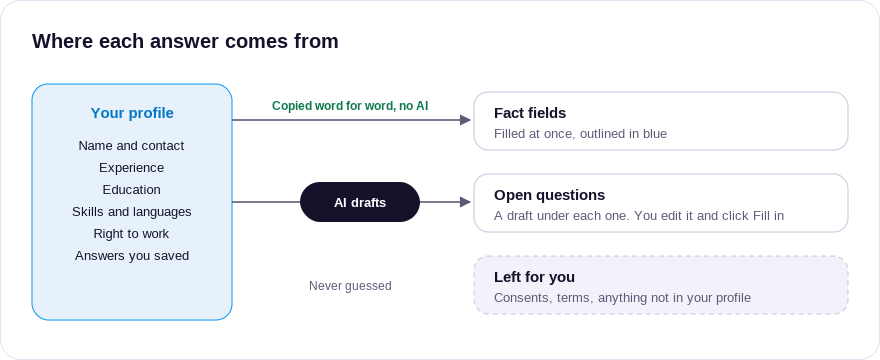
Your dates, job titles, employers, degrees and numbers should be copied from your CV, not written by a model. A model that fills a gap with something plausible can put a claim in your application you never made, and you would have to defend it in an interview.
That's why OneClick Apply copies facts from your profile word for word, and only uses AI to draft open questions. If something isn't in your profile, it is left empty for you, not invented.
Before you send any AI draft, check every number in it. If the draft says you "led a team of ten" and you led a team of six, change it. Small exaggerations are the easiest thing for an interviewer to test.
Rule 2: answer the question they asked
Generic drafts answer a generic question. Before you accept a draft, check it says something about this company and this role. One specific sentence beats three general ones:
"Your move to self-serve onboarding is the problem I spent two years on at my last job."
says more than
"I am passionate about innovative companies that value customer experience."
A simple way to make any draft specific:
- Find one line in the job description that matters to you. A product, a problem, a value they name.
- Find one fact from your own experience that connects to it. A project, a result, a skill you used.
- Write one sentence that joins the two. Put it first.
That sentence is the part no one else applying can copy.
Rule 3: cut the words that give AI away
Some words and phrases appear far more in AI text than in anything people write. Delete them on sight, or swap them for something plainer:
| Instead of | Try |
|---|---|
| "I am thrilled / excited to apply" | Start with why this role, in one sentence |
| "passionate about" | What you actually did about it |
| "leverage" | "use" |
| "delve into" | "look at", "work on" |
| "dynamic, fast-paced environment" | The real situation, in your words |
| "In today's rapidly evolving world" | Delete it |
Also watch for lists of three adjectives in a row, and a closing paragraph that repeats the first one. Read the answer out loud. If you wouldn't say it to the hiring manager across a table, rewrite it.
Rule 4: respect the length
When a form gives a word or character limit, aim for a little under it. When it doesn't, shorter is safer:
- Open questions: three to five sentences, about 100 to 200 words.
- Cover letters: about 250 to 400 words, one page at most.
- One-line fields: one line. Don't paste a paragraph into a box meant for a sentence.
A short answer that is specific is read in full. A long one is skimmed.
Rule 5: be honest if they ask about AI
Some application forms now ask whether you used AI to write your answers. If one does, answer honestly. Using a tool to draft and then rewriting in your own words is a normal way to work, and an honest answer costs you far less than a dishonest one discovered later.
Rule 6: you press Submit
However good the draft, read the whole application before it goes. That is the one step no tool should take away from you, and it is why OneClick Apply always stops before Submit.
Where AI genuinely helps
None of this means AI is a bad idea. Used well, it takes away the parts of an application that drain you, and leaves you the parts that matter. It is good at:
- Getting you past a blank page. A rough first draft is easier to fix than an empty box at 11 pm.
- Spotting what the question really asks. A question like "Tell us about a challenge" often wants a short story: the situation, what you did, and the result.
- Trimming to a limit. Ask for a shorter version when you're 50 words over.
- Checking tone. Ask whether an answer sounds confident or apologetic, and why.
It is bad at knowing you. It doesn't know what you're proud of, what you actually did, or why this company in particular. That part has to come from you.
Working with OneClick Apply's drafts
When a form has open questions, OneClick Apply writes a draft under each one, from your profile. Nothing goes into the form until you click Fill in. A good routine:
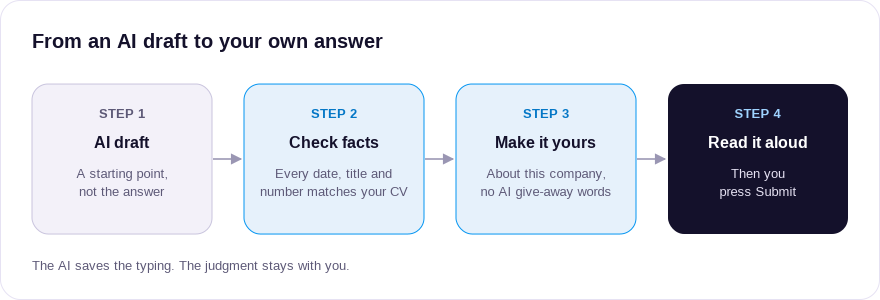
- Read the draft and keep any sentence that is true and useful.
- Replace the opening with your one specific sentence (Rule 2).
- Check every fact against your CV (Rule 1).
- Click Fill in, then make your last edits in the form itself.
Five minutes on each open answer is time well spent. It is the part of the application that the recruiter reads most closely.
A worked example
Here is a typical AI draft for "Why do you want to work here?":
"I am excited to apply for this position at your innovative company. I am passionate about technology and believe my skills in project management and communication make me a strong fit for your dynamic team."
Nothing in it is about the company, and every phrase could be in anyone's application. Apply the rules:
- One line from the job description: the company is moving its customers to a new billing system.
- One fact from the CV: you moved 400 customers to a new system at your last job, with no lost accounts.
- Join them, and cut the rest.
"You're moving your customers to a new billing system next year. At my last job I moved 400 customers to a new platform without losing an account, and I'd like to do that again, for a product I already use."
Same length, and now it could only be you.
A quick checklist before you send
- Every fact matches your CV.
- Each open answer mentions this company or this role.
- No phrase from the table above.
- Within the length asked.
- You would be happy to be asked about any sentence in an interview.
If all five are true, the AI saved you time without costing you your voice.
*Related: How to fill a Workday application in minutes and Auto-apply bots, AI agents or OneClick Apply: which should you use?*
Try it on your next application
Your first 5 applications are free. OneClick Apply fills the form and stops before Submit.
Sign upRead next
More guides


OneClick Brief · every Monday
Get the next guide in your inbox
A job search prompt for the week, new guides and what's new in OneClick Apply.