

 iMelonArt
How to · 8 min read
How to keep track of your job applications
A simple spreadsheet tracker for your job applications: what to log, when to follow up and a 15 minute weekly review, so no application or reply slips through.
November 25, 2026

You apply on Monday. By Thursday you can't remember which version of your CV you sent, whether the company was in Austin or Denver, or if you already applied to that second posting. A simple tracker fixes this. Use a spreadsheet with one row per job application and eight columns: company, role, link, date applied, status, CV version, follow-up date and notes. Add the row right after you press Submit, and spend 15 minutes once a week reviewing it.
This guide shows you what to log, how to set it up in 10 minutes and when to follow up. It works with any tool, or none.
Why a tracker is worth the 10 minutes
Career sites don't talk to each other. Each Workday, Greenhouse, Lever or Ashby form is its own little world, and the confirmation email is often the only proof you applied. Those emails get buried.
A tracker gives you three things:
- No double applications. You can search the sheet for the company before you start.
- The right answer when they call. A recruiter phones about "the marketing role" and you can see in five seconds which one it was and what you sent.
- A calm view of your search. Ten rows with no replies feels different from a vague worry that nothing is happening.
It also helps with a practical matter. If you claim unemployment benefits, your state may ask you to keep a record of your work search. A September 2026 state-by-state roundup from Callings.ai lists rules that differ by state, such as how many employer contacts you need each week and how long you must keep your record. Always check your state's own unemployment agency for the current rule and its official log. Your tracker can hold the same information, but it doesn't replace a form your state requires.
What to put in your tracker
Keep it small. If a column takes more than a few seconds to fill, you will stop filling it.
| Column | What to write | Why it matters |
|---|---|---|
| Company | The employer's name | Lets you search for repeats |
| Role | The exact job title from the posting | Postings often have near-identical titles |
| Link | The URL of the posting | Postings get taken down, so you want the address |
| Date applied | The day you pressed Submit | Drives your follow-up date |
| Status | One of five words (see below) | Shows where each application stands |
| CV version | A short label, such as "CV general" or "CV data roles" | Tells you what the recruiter has seen |
| Follow-up date | A date 7 to 10 days after you applied | Gives you a reminder |
| Notes | Contact names, salary range, anything odd | Saves you from searching your inbox |
A ninth column for the source (career site, referral or job board) is optional but tells you after a month where your applications come from.
Set it up in 10 minutes
1. Make the sheet
Open any spreadsheet app. Google Sheets, Excel and Numbers all work. Type the eight column names in the first row and freeze that row so it stays visible.
2. Add a drop-down for status
Turn the Status column into a drop-down list with five choices: Saved, Applied, Replied, Interview and Closed. Fixed words let you filter and count later. Free text such as "waiting?" or "pending maybe" does not.
3. Add a reminder for follow-ups
Put a formula in the follow-up column that adds 7 days to the date applied, or just type the date by hand. Then sort by follow-up date once a week. If you use a calendar app, you can also add a single recurring event called "Job search review" instead of a reminder per job.
4. Save the posting text
Postings disappear when a role is filled. Copy the job description into a note or a PDF and save it in a folder named after the company. If an interview invitation arrives three weeks later, you will still know what the job asked for.
5. Keep passwords out of the sheet
Many career sites ask you to create an account. Do not store passwords in a spreadsheet. A password manager does that job safely, and your sheet can just say which email address you used.
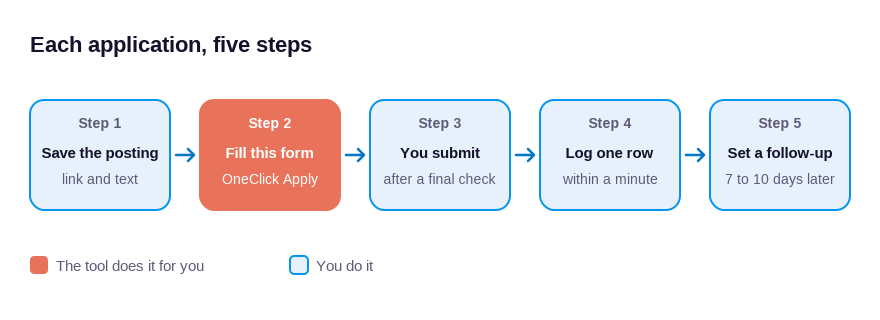
Log the row right after you press Submit
The best moment to log an application is the minute after you submit it. The details are fresh and the confirmation page is still open.
OneClick Apply can help with the form itself. On the application page you press Fill this form and your facts are copied word for word from your profile. It drafts answers to open questions for you to review, and it never presses Submit. That last point works nicely with a tracker: you press Submit yourself, so that is your cue to log the row.
If a form comes in steps, such as many Workday applications, log one row for the whole application. Several steps or pages of the same application on the same day count as one application in OneClick Apply too, so one row per application keeps the numbers consistent. For help with long multi-step forms, read how to fill a Workday application in minutes, not an hour.
OneClick Apply fills forms. Keeping the record is a separate job, and a spreadsheet does it well.
Five statuses are enough
More statuses feel organized, but they make you hesitate. Use five and define each one.
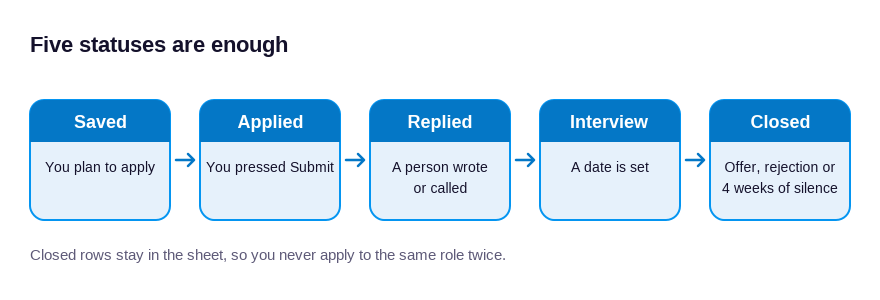
- Saved: you plan to apply but haven't yet.
- Applied: you pressed Submit.
- Replied: a human wrote or called, even to say "we received it" in a personal note. An automatic confirmation does not count.
- Interview: a date is set or you have already talked.
- Closed: you got an offer, a rejection, or four weeks have passed with no reply and you have decided to move on.
Closing a row doesn't delete it. You still want it there so you don't apply to the same role twice.
A worked example
Here is what three rows might look like after one week.
| Company | Role | Date applied | Status | CV version | Follow-up | Notes |
|---|---|---|---|---|---|---|
| Northwind Dental | Office manager | November 17, 2026 | Replied | CV general | November 25, 2026 | Maria in HR wrote back, call on Friday |
| Lakeside Logistics | Operations analyst | November 18, 2026 | Applied | CV data roles | November 27, 2026 | Salary range $62,000 to $70,000 in posting |
| Harbor Books | Bookkeeper | November 19, 2026 | Closed | CV general | Rejection email November 21 |
These companies are made up. On Wednesday, November 25, you open the sheet, sort by follow-up date and see that one call is coming and one follow-up is due. That takes under a minute.
When and how to follow up
There is no official rule for how long to wait, and employers differ a lot. A reasonable habit is to wait 7 to 10 days after you apply, then send one short, polite note if you have a name to write to. That is our suggestion, not a law of hiring.
A good follow-up has three parts:
- The role you applied for and the date.
- One sentence on why you are still interested.
- A thank-you and an offer to send anything else they need.
If there is no reply to one follow-up, log it in Notes and move on. Sending three messages in a week rarely helps and can annoy people.
A 15-minute weekly review
Once a week, same day and time, run this checklist:
- Sort by follow-up date and send any notes that are due.
- Change the status of anything that moved.
- Close rows that have been quiet for four weeks.
- Count how many applications you sent this week.
- Look at the CV version column. Did one version get more replies?
- Pick next week's goal, such as 5 applications or 2 follow-ups.
The last two items matter most. Small, honest numbers beat guessing. Don't read too much into a sample of 10 or 20 applications, though. It's a hint, not a verdict.
Common snags
You forgot to log a few. Search your email for "thank you for applying" or "application received" and fill in the gaps. Do it once, then switch to logging right after Submit.
Your sheet has 80 rows and feels heavy. Filter out Closed rows or move them to a second tab called Archive. Don't delete them.
You keep forgetting the CV version. Name your files clearly, for example "Jane-Doe-CV-data-roles.pdf", and copy that name into the sheet.
You apply through a job board's own button. Log those too. A tracker is about your whole search, not about one tool.
When this is not for you
If you apply to two or three jobs a month, your email inbox and a notes app may be enough. A tracker pays off when you have around 10 or more open applications, or when your state asks for a record. Don't build an elaborate system that costs more time than the search itself.
Questions people ask
Should I use a spreadsheet or a dedicated app?
Start with a spreadsheet. It's free, it exports anywhere and you control the data. If you outgrow it, you will know exactly what features you want.
Do I need to track jobs I only saved?
Only if you plan to apply. A Saved row with a deadline is useful. A list of 40 "maybe" jobs is not.
What if the employer asks which CV I sent?
Open your CV version column and the folder with that file. That is exactly what it is for.
Where do I get help with OneClick Apply?
Visit oneclickapply.net/support. For advice on drafting open answers, see using AI on job applications without sounding like a robot.
Summary
Keep one spreadsheet with a row per job application: company, role, link, date applied, status, CV version, follow-up date and notes. Log each row the minute after you press Submit. Use five statuses, follow up once after 7 to 10 days and review the sheet for 15 minutes each week. If you claim unemployment benefits, check your state's own rules for work search records. A tracker takes minutes to set up and saves you from double applications and missed replies.
Try it on your next application
Your first 5 applications are free. OneClick Apply fills the form and stops before Submit.
Sign upRead next
More guides


OneClick Brief · every Monday
Get the next guide in your inbox
A job search prompt for the week, new guides and what's new in OneClick Apply.