

 iMelonArt
How to · 8 min read
Job application questions you can answer once and reuse
The same questions come back on every application: work authorization, salary, start date. Write your answers once, know which to recheck, and move faster.
November 25, 2026

You open a new application and the same questions are waiting again. Are you authorized to work here? What salary do you expect? When can you start? Typing them out once is fine. Typing them out for the twentieth time is what wears you down. The quick way: write your standard answers once in a short answer sheet, check each one for the job in front of you, and reuse them.
This guide shows which questions come back on almost every application, how to answer them honestly, and which ones you should still look at every time.
Why the same questions keep coming back
Career sites such as Workday, Greenhouse, Lever and Ashby are built by different companies, and each employer sets up its own form. But the employers all need the same basic facts before a recruiter will look at you. So the wording changes, and the questions don't.
That is good news. A question you have already thought about is a question you can answer in seconds. The slow part is the thinking, not the typing. Do the thinking once, on a calm evening, and not at 11 pm with a form half done.
The questions that come back most
Here are the ones you will meet again and again. The right column is what to prepare.
| Question | What the employer wants to know | What to prepare |
|---|---|---|
| Are you authorized to work in this country? | Whether you can legally take the job | One true answer for your situation |
| Will you now or in the future need sponsorship? | Whether the employer would have to sponsor a visa | One true answer, read the wording each time |
| Salary expectations | Whether you fit the budget | A range, plus one number if the field needs it |
| Start date or notice period | How soon you can begin | Your real notice period in weeks |
| Location, relocation, remote | Whether the place and the work setup suit you | Where you live and what you would accept |
| Links | Where to see your work | LinkedIn, portfolio, GitHub, website |
| How did you hear about us? | Which channels work for them | A short, true source |
| Worked here before, or know someone here? | Conflicts and referrals | Yes or no, and a name if yes |
| Languages | What you can work in | Languages and your level |
| Why this role? Why this company? | Whether you care about this job | Not reusable: write it fresh each time |
The last row is the exception. Open questions need a new answer for each job, and we cover them in using AI on job applications without sounding like a robot.
Work authorization and sponsorship: be exact
These two questions look alike, but they are not the same question. One asks if you can work in a country today. The other asks if you will need the employer's help with a visa now or later. Many forms ask both, in different words.
Your only job here is to answer truthfully, and to read the exact wording each time. "Authorized to work" and "require sponsorship" can both be true for some people, for example while on a temporary status. If you are not sure how a question applies to you, don't guess. Ask the recruiter or an immigration attorney before you press Submit.
Write your answer sheet entry in a full sentence, so you can see if it fits each form:
- "I am authorized to work in the US for any employer."
- "I will require sponsorship to continue working in the US after [date]."
A wrong answer here can cost you an application, or worse, a job offer later. It is the one place where speed should never beat accuracy.
Salary expectations: have a range ready
Employers ask for a number so they can decide quickly if you are in budget. Before you answer, look at the job post. If it lists a pay range, use it as your starting point. If it doesn't, check what similar roles in your area pay and decide the lowest figure you would accept.
Keep two versions in your answer sheet:
- A range, for fields that take text, such as "$85,000 to $95,000, open to discussion".
- A single number, for fields that only take digits. Pick a figure you would be happy to receive.
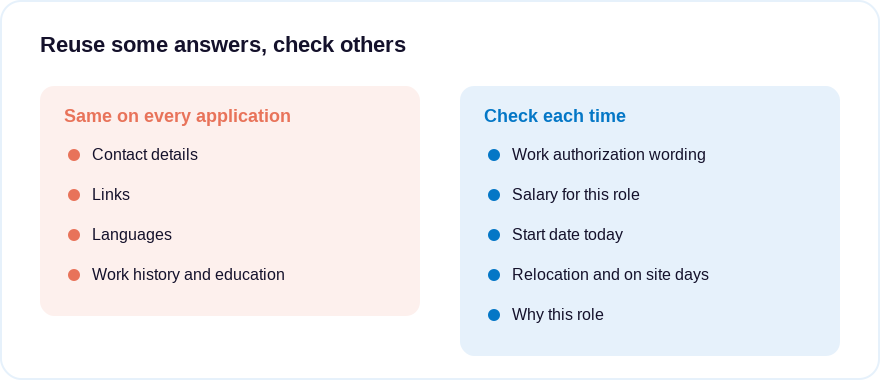
Don't reuse a number blindly. A role in another city, or at a different level, needs a fresh look. This is a question to check every time, even when you have an answer saved.
Start date, notice period and location
Be realistic. If you must give four weeks' notice, say four weeks. For location, write down where you live, whether you can relocate, and what remote or hybrid setup you would accept. Forms usually want a yes or no, so keep a clear one for each.
Build your answer sheet in 20 minutes
You can do this in any note or document.
Step 1: Open three recent applications
Look at the questions in three forms you have filled in lately, or the ones you are about to. Copy every question that is not about the job itself.
Step 2: Write one true answer for each
Use full sentences for the sensitive ones (work authorization, sponsorship). Use short, plain lines for the rest. If you don't know an answer yet, such as your target salary, decide it now.
Step 3: Mark what changes per job
Put a star next to anything that depends on the role: salary, start date, relocation, "how did you hear about us". These are the ones you will glance at every time.
Step 4: Keep it with your CV
Store the sheet beside your CV, so you update both together.
A worked example
Here is how Sam, a marketing manager in Austin who gives four weeks' notice, might fill in a sheet.
| Question | Sam's answer | Check each time? |
|---|---|---|
| Authorized to work in the US | Yes | Read the wording |
| Need sponsorship now or in future | No | Read the wording |
| Salary | $85,000 to $95,000, or $90,000 in a number field | Yes |
| Start date | 4 weeks after an offer | Yes |
| Relocation | No, based in Austin. Hybrid is fine | Yes |
| Links | LinkedIn and portfolio URLs | No |
| How did you hear about us | Company careers page | Yes |
| Languages | English (native), Spanish (professional) | No |
Notice that half the rows say "Yes" in the last column. The sheet doesn't remove your judgment. It removes the typing and the second-guessing.
Where OneClick Apply fits
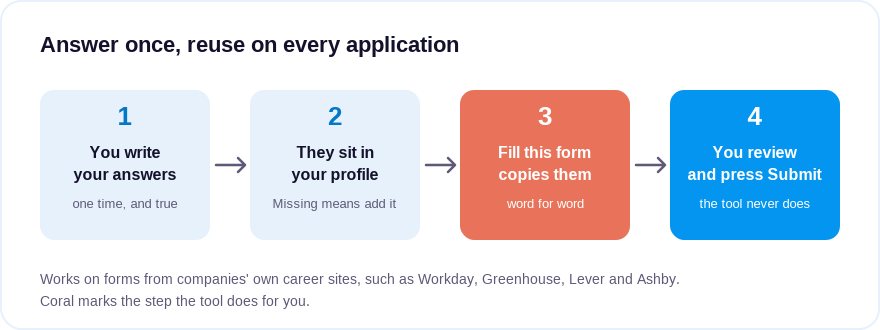
If you use OneClick Apply, your profile is the answer sheet. You upload your CV as a PDF and it builds your profile. Anything it can't find is marked Missing, and it never guesses. That is where you add your right to work and the answers you want to reuse.
On an application form, press Fill this form. Facts such as your contact details, experience, education, skills, languages, links, right to work and the answers you saved are copied word for word from your profile. No AI is used for those. Answers it isn't sure about are marked for you to check.
For open questions like "Why this role?", it drafts an answer with AI from your profile and shows it under the question. Nothing is filled until you click Fill in. It never presses Submit. You review the form and send it yourself. On a form with several steps, press Fill this form on each step. Several steps of the same application on the same day count as one application.
Self-identification questions (gender, ethnicity, disability, veteran status) are only filled if you chose to save answers, with your consent. If you don't save answers, those questions are left for you.
For a full walk through a long form, see how to fill a Workday application in minutes. During the public beta, the first 5 applications are free, then 5 more free every month.
Common snags
- A question with unusual wording. If a form asks something your sheet doesn't cover, answer it yourself and add it to your sheet for next time.
- Yes or no questions that depend on the job. "Can you work on site three days a week?" has a different answer for a role in Chicago than for one in Denver.
- Old answers. A notice period or a salary target from six months ago may be out of date.
- Job boards' own Apply buttons. OneClick Apply doesn't automate LinkedIn Easy Apply or Indeed Apply. It works on the application forms on companies' own career sites.
When this is not for you
If you send only two or three carefully tailored applications a month, an answer sheet in a note may be all you need. A tool saves time when you apply often, and when the forms are long. If your situation is complicated, such as a visa that changes by role, you should read every field yourself anyway. Fast help doesn't replace a clear head here.
Before you press Submit
- Does the work authorization answer match the exact wording of this form?
- Is the salary right for this role and this city?
- Is the start date true today?
- Do the links open and point to the right pages?
- Did you check every answer marked for you to check?
- Is every claim in your open answers true?
Questions people ask
Can I leave the salary field empty? It depends on the form. If the field is required, you will have to enter something. Give a number you could live with, and use a range when the field takes text.
Should I say yes to everything to get through the form? No. Every answer should be true. A yes you can't back up will cause trouble at the offer stage.
How often should I update my answer sheet? Whenever something changes, and in any case once a month while you are searching.
Where can I get help with OneClick Apply? Visit oneclickapply.net/support.
Summary
The same handful of questions appears on almost every application. Write one true answer for each, mark the ones that change with the job, and keep the sheet next to your CV. Read work authorization and sponsorship wording every time, and check salary and start date before you send. Then the form is a quick pass, and your time goes to the questions that are really about the job.
Try it on your next application
Your first 5 applications are free. OneClick Apply fills the form and stops before Submit.
Sign upRead next
More guides


OneClick Brief · every Monday
Get the next guide in your inbox
A job search prompt for the week, new guides and what's new in OneClick Apply.