

 iMelonArt
Advice · 7 min read
Self-identification questions on job applications: your options
Gender, race, disability and veteran questions on a job application are voluntary. What the form says, your three options, and how to answer once and move on.
November 25, 2026

You reach the last step of a long application and a new page asks about your gender, race, disability or veteran status. Do you have to answer? These questions are voluntary, and the federal disability form even has a box for "I don't wish to answer." So the choice is yours: answer, decline, or answer some and skip others. This guide helps you decide once, so you don't have to think it over again on every job application.
The short answer
According to the form, these questions exist so the employer can measure how well it is doing, not to judge you. The federal disability form says that completing it is voluntary and that, for a job applicant, any answer is kept private and not used against you. You can say yes, no, or decline.
Nobody can tell you the right answer, because it depends on you. What you can do is make the choice on purpose, when you are calm, instead of clicking something at 11 pm because the page won't move on.
This guide is general information, not legal advice. If you have a specific worry about how an employer handles your answers, ask the employer's recruiting contact before you apply.
What the federal disability form says
One well-known version of these questions in the US is the federal disability form known as CC-305. We read a public copy of it hosted by a university. It is an older copy, so the wording on the form in front of you may differ a little. Here is what that copy says, in plain words:
- Why you are asked. The employer does business with the government and has to reach out to, hire and give equal opportunity to qualified people with disabilities. It asks so it can measure how well it is doing.
- It is voluntary. The form says completing it is voluntary and that an applicant's answer will be kept private and not used against them.
- Three answers. Yes, I have a disability (or previously had one). No, I don't have a disability. I don't wish to answer.
- What counts as a disability. The form describes a physical or mental impairment or medical condition that substantially limits a major life activity, or a history or record of one. It lists examples, and the list is not complete.
The same document also contains a veteran self identification page. It explains that the employer is a government contractor subject to a federal law called VEVRAA, and that it asks so it can measure how well its outreach and recruitment efforts work. It lists categories such as disabled veteran, recently separated veteran (within three years of discharge), active duty wartime or campaign badge veteran, and armed forces service medal veteran.
Gender and race or ethnicity questions may be worded differently on each form, so we don't quote a text for them. Read the options every time. The next sections apply to all of these questions.
Disability self identification is not an accommodation request
This is easy to miss. The disability form and a request for help are two different things. The copy of the form we read has a separate notice about reasonable accommodation. It asks you to tell the employer if you need an adjustment to apply or to do the job, such as a change to the application process, documents in another format or a sign language interpreter.
So if you need an adjustment to complete an application, don't rely on ticking a box in the self identification step. Contact the employer's recruiting or HR contact directly and say what you need.
Your three options
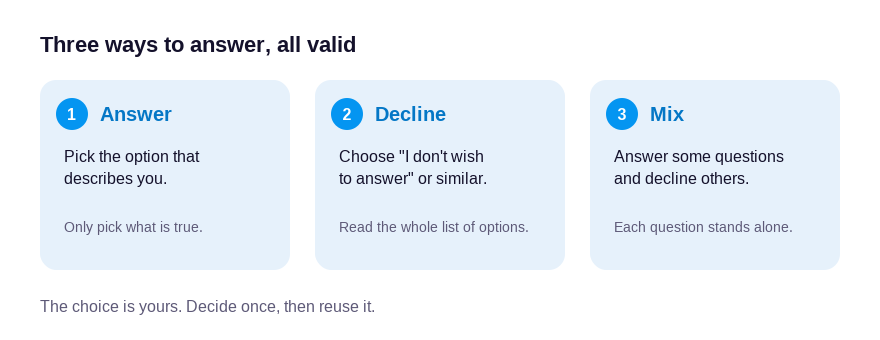
| Option | What you do | Worth knowing |
|---|---|---|
| Answer | Pick the option that describes you | The form says the answer is kept private for applicants. It is used to measure the employer's outreach. |
| Decline | Choose "I don't wish to answer" or a similar option | The disability form offers this choice by name. Wording on other questions varies, so read the list. |
| Mix | Answer some questions and decline others | Each question stands alone. You can be comfortable with one and not another. |
None of these is a trick. Each one is a valid way to complete the form. The only wrong move is picking an answer that isn't true.
A five minute checklist for deciding
Do this once, away from an application form, and write down your answers.
- Read each question type. Gender, race or ethnicity, disability, veteran status. Decide each one separately.
- Read what the form says it is used for. Look for a line about private answers, reporting or measuring outreach. If you can't find one, ask the employer before you apply.
- Pick Answer, Decline or Mix for each question. Say it out loud. If you hesitate, decline for now. You can answer differently on your next application.
- Check the exact words. "Prefer not to say," "I don't wish to answer" and "decline to self identify" all mean the same thing. Know which phrase to look for.
- Note any accommodation you need. Write down who to contact, separately from the form.
- Keep a copy. A short note on your phone is enough, so you answer the same way each time.
Questions that look similar but are not voluntary
Not every personal question on an application is a self identification question. Questions about your right to work in the US, whether you need sponsorship, your address or your work history are facts about you. They affect whether an employer can hire you, so answer them accurately every time.
A quick test: does the form offer a decline option and say that it is voluntary? If yes, it is probably a self identification question. If the question is required and has no decline option, treat it as a normal application question.
Worked example
Here is a made-up example. Maya is applying to six companies this week. She sits down for five minutes with the checklist. She decides to answer the veteran status and gender questions, and to decline the race and ethnicity question. She chooses "I don't wish to answer" for disability, and she makes a note to email recruiting about extra time for an online assessment.
Now every application gets the same answers. She does not reread each question and wonder again. The decision took five minutes the first time and no time after that.
Using OneClick Apply for these questions
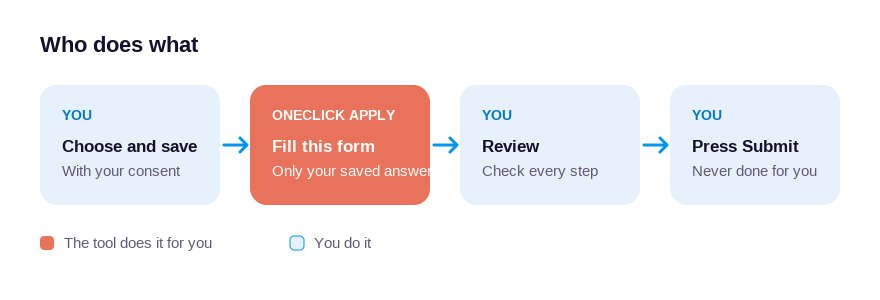
OneClick Apply does not decide for you. It follows what you tell it, and only that.
- Self identification questions (gender, ethnicity, disability, veteran status) are only filled if you chose to save answers, with your consent. If you did not save answers, it does not fill them, and you answer on the form yourself.
- Facts such as your name, contact details and right to work are copied word for word from your profile. Anything it can't find is marked Missing for you to add. It never guesses.
- On a form with several steps, press Fill this form on each step. The self identification step is just another step.
- It never presses Submit. You look at every answer, including the self identification page, and send the application yourself.
On privacy, your data is stored in the EU, never sold, never used for advertising and never used to train AI. You can export or delete your data at any time. Questions about any of this go to oneclickapply.net/support.
If you are still setting up your profile, our guide on filling a Workday application in minutes shows how Fill this form works on a long, stepped form. For the open questions, such as "Why this role?", read using AI on job applications without sounding like a robot.
Common snags
- The decline option is hidden at the bottom of a long list. Scroll the whole dropdown before you choose something.
- The wording changes between employers. Don't rely on memory of one form. Read the options each time and match your decision to the words.
- The page won't continue. Check that every required field on the page is complete, including ones above the fold. If a required self identification question really has no decline option, email the employer's recruiting contact and ask.
- You answered by mistake. Change it before you submit, because you may not be able to change it afterwards. Check this step before you press Submit.
- Your situation changes. Your answers can change from one application to the next. The form copy we read even notes that a person may become disabled at any time.
When this is not for you
If you like to decide fresh each time, or the answer depends on the employer, saving answers adds little. Answer on the form by hand. That is a fine way to do it.
If you want an answer on whether to disclose a disability or a veteran status to a specific employer, a tool can't help. Talk to the employer, a career counselor or a legal aid service.
OneClick Apply also does not touch job boards' own one-click Apply buttons, such as LinkedIn Easy Apply or Indeed Apply. It works on the application forms on companies' own career sites.
Summary
Self identification questions are voluntary, and the federal disability form says so and offers a way to decline. You can answer, decline or mix, and any of these is a legitimate choice as long as what you pick is true. Decide once with the checklist, keep your accommodation requests separate from the form, and treat right to work questions as normal facts. If you save answers in OneClick Apply, it fills only those, only with your consent, and you still review everything and press Submit yourself.
Try it on your next application
Your first 5 applications are free. OneClick Apply fills the form and stops before Submit.
Sign upRead next
More guides


OneClick Brief · every Monday
Get the next guide in your inbox
A job search prompt for the week, new guides and what's new in OneClick Apply.